
Weibo Data Extraction Tool for Browser
Overview
The Weibo Data Extraction Tool is a browser-based utility designed to assist users in collecting and managing user data from Weibo, one of China’s most popular social media platforms. It enables users to extract user records from any Weibo list page—such as search results, trending topics, or follower lists—with a single click. The tool supports batch extraction of over 1,000 user records per session, making it suitable for users managing large-scale social media campaigns or conducting audience research. Its primary function is to streamline data gathering, allowing users to analyze or engage with target audiences efficiently.
Target users include social media managers, digital marketers, content creators, and researchers who rely on Weibo for audience engagement or market analysis. The tool is particularly useful for those needing to identify potential followers, analyze user behavior based on engagement metrics (likes, comments, retweets), or automate interactions such as liking, commenting, or sending private messages. The developer, wenbinke, has maintained the tool since 2014, with regular updates addressing login stability, data collection accuracy, and feature enhancements.
Real-world applications include building targeted outreach campaigns, monitoring competitor activity, or organizing user lists for bulk engagement. All collected data remains stored locally within the user’s browser, ensuring no automatic transmission of sensitive information to external servers. This design emphasizes user privacy and data control, which is a key advantage for privacy-conscious users.
Key Features & Capabilities
- Batch Data Extraction – Extracts up to 1,000+ user records from any Weibo list page in a single operation, reducing manual effort and time.
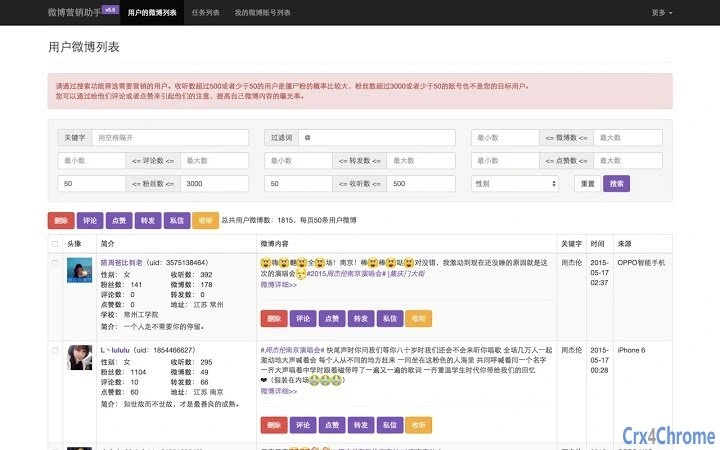
- Advanced Filtering Options – Allows filtering users by gender, number of likes, comments, and retweets, enabling precise audience targeting.
- Multi-Account Support – Supports multiple Weibo accounts, allowing users to manage different profiles and switch between them seamlessly.
- Automated Interaction Features – Offers functions to automatically like, comment, or send private messages to selected users, with configurable timing to avoid detection.
- Local Data Storage – All extracted user data is stored locally in the browser, ensuring user data privacy and preventing unauthorized access.
- Task Management & Scheduling – Includes a task queue system that executes actions at intervals (e.g., every 5 seconds) to reduce the risk of being flagged by Weibo’s anti-bot systems.
- Search & Navigation Integration – Works on all Weibo list pages, including search results, trending topics, and personal微博 streams, ensuring broad compatibility with common user workflows.
These features collectively support efficient data collection and targeted engagement. For example, a marketer can extract users from a trending topic, filter by high engagement, and schedule automated likes and comments to boost visibility. A researcher might use the tool to compile demographic data from public lists for analysis. The ability to preserve data locally adds a layer of trust, especially for users concerned about data privacy.
User Interface, Workflow & Performance
The tool integrates directly into the browser environment, operating as a plugin or extension. Users access it by clicking a dedicated button on any Weibo list page, then selecting the “Extract Data” option. The interface is minimal and functional, designed to avoid disrupting the user’s browsing experience. Navigation is straightforward: after extraction, users can view the list, apply filters, and initiate actions like liking or commenting with a few clicks.
Workflow efficiency is enhanced by the tool’s automated task queue, which ensures actions are executed at regular intervals, reducing the risk of triggering rate limits or being blocked by Weibo’s systems. The tool also includes a logging system that tracks extraction and interaction activities, which can be useful for monitoring campaign progress or troubleshooting issues.
Performance details were not specified by the developer. However, given the tool’s lightweight nature (1.2 MB) and browser-based architecture, it is expected to have minimal impact on system resources. The developer did not provide specific information about CPU or RAM usage. Stability is supported by a long history of updates addressing login failures, data collection bugs, and display issues, indicating ongoing maintenance and reliability.
Compatibility & System Requirements
The Weibo Data Extraction Tool is compatible with Windows, Mac, and Linux operating systems. It functions as a browser extension, meaning its performance depends on the host browser’s capabilities. The software version is 1.0, with a file size of 1.2 MB, indicating a lightweight installation.
Exact system requirements were not listed. Compatibility with specific browser versions or minimum hardware specifications was not provided. The developer did not specify whether the tool requires administrative privileges or internet access for core functionality. Users should ensure their browser supports extensions and has JavaScript enabled for full functionality.
Pros and Cons
Pros
- Efficient batch extraction of over 1,000 user records per session
- Advanced filtering by gender, engagement metrics, and other criteria
- Supports multiple Weibo accounts for multi-profile management
- Local data storage ensures privacy and user control
- Automated task scheduling helps avoid detection by anti-bot systems
- Regular updates and long-term developer support since 2014
- Lightweight design with minimal system resource usage
Cons
- Compatibility with specific browser versions not clearly defined
- No official documentation or user guide provided
- Performance and resource usage details not specified
- Dependent on browser environment, which may vary across platforms
- Limited information on update frequency or future development plans
FAQ Section
Is the tool compatible with all browsers?
The tool is designed to work with browsers that support extensions, but specific browser compatibility was not detailed by the developer.
Does the tool collect my personal data?
All user data is stored locally within the browser and is not automatically collected or transmitted to external servers. The developer emphasizes user privacy and data control.
Can I use multiple Weibo accounts with this tool?
Yes, the tool supports multi-account functionality, allowing users to manage and switch between different Weibo profiles.
How often does the tool update?
Updates have been released regularly since 2014, with the latest update on October 3, 2018, addressing issues related to Weibo’s search function changes.
Is the tool safe to use on Weibo?
The tool is designed to minimize detection risks by spacing out automated actions and storing data locally. However, users should be aware that automated interactions may violate Weibo’s terms of service.
Final Thoughts
The Weibo Data Extraction Tool offers a powerful, privacy-focused solution for users who need to collect and manage Weibo user data efficiently. Its ability to extract large volumes of records, filter by engagement metrics, and automate interactions makes it a valuable asset for digital marketers, social media managers, and researchers. The emphasis on local data storage enhances trust and security, especially for users handling sensitive information.
While some details such as system requirements and browser compatibility are limited, the tool’s long development history and consistent updates suggest reliability and ongoing support. For users seeking a lightweight, functional utility to streamline Weibo data collection and engagement, this tool delivers strong value.
Download Weibo Data Extraction Tool now







